Anima
AI
SaaS
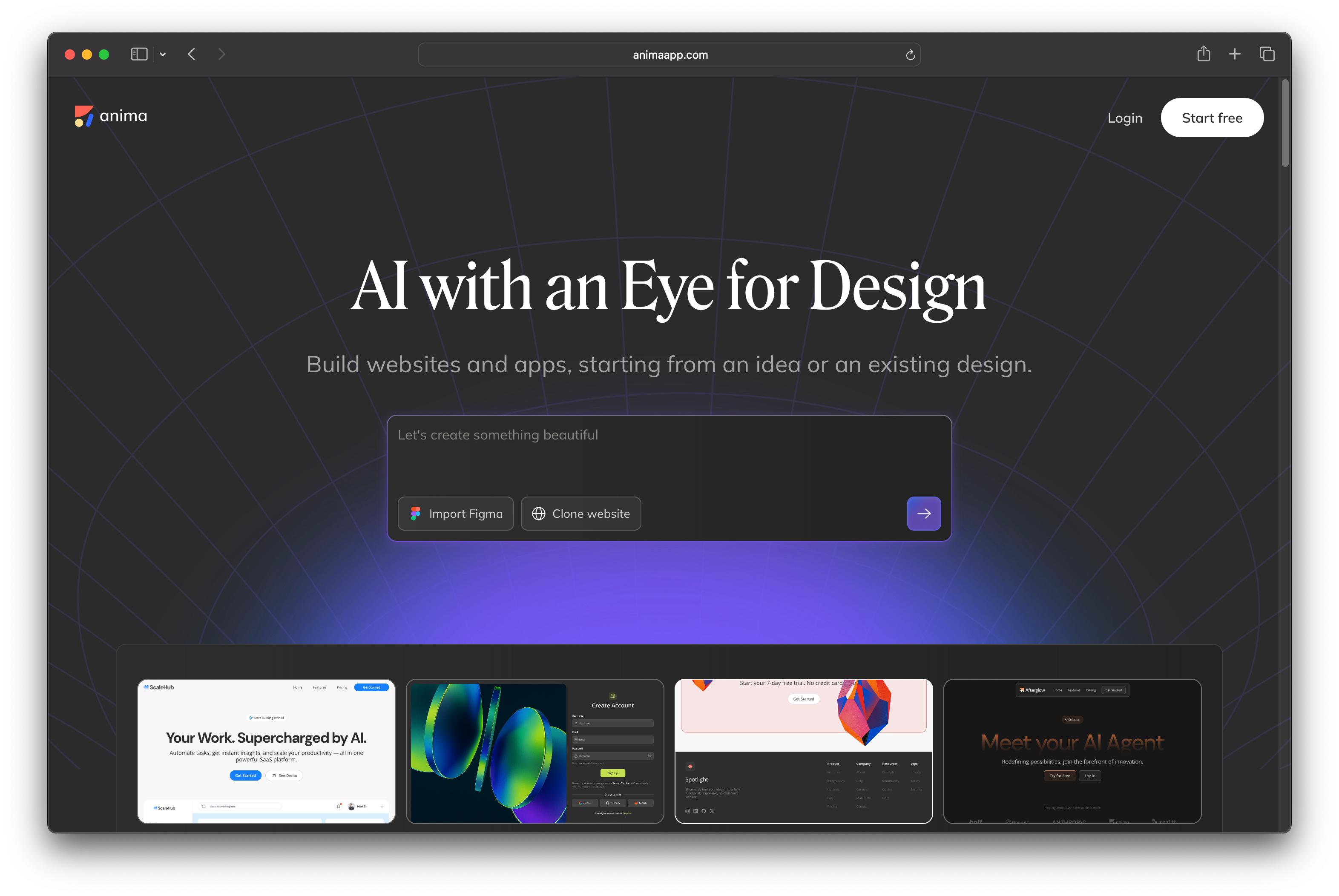


An AI Platform That Turns Designs Into Production-Ready Code
The Challenge
Two developers, Avi and Dan, had a vision: designers shouldn't need to know code to ship their ideas. They'd seen too many beautiful Figma designs die in handoff—lost in translation between designers and developers, or never built at all because founding teams lacked engineering resources.
Their idea: Build an AI platform that converts Figma designs into pixel-perfect, production-ready code. Let designers ship products themselves. Let non-technical founders launch MVPs without hiring a dev team.
The problem? They were backend engineers. They could build the AI engine and code generation pipeline, but they had no idea how to design a product that designers would actually want to use.
They posted on a design forum: "Looking for a Head of Product Design to join a 3-person founding team. We're building Figma-to-code AI. Need someone who understands both design tools and developer workflows."
I responded. We met. I joined as the third co-founder and Head of Product Design.
My Role: Head of Product Design
As the design lead on a technical team, I owned:
Product Strategy & UX:
Defined the end-to-end user journey for both designers and developers
Conducted user interviews with 50+ designers to understand pain points in design-to-code workflows
Mapped out the core product philosophy: "AI with an eye for design"
Interface Design:
Designed the entire product UI in Figma (yes, using the tool we were building for)
Created a design system that balanced simplicity with power-user features
Built interactive prototypes for user testing before any code was written
Design-to-Development Collaboration:
Worked directly with the engineering team to ensure designs were technically feasible
Tested every feature iteration to validate that generated code matched design intent
Created detailed design specifications for complex interactions and edge cases
The Product Vision
The Problem We Identified:
After interviewing designers, developers, and founders, we found three core pain points:
Designers spent weeks creating pixel-perfect Figma files that developers rebuilt from scratch, losing 60% of design details in translation
Developers wasted time recreating layouts instead of building features
Non-technical founders couldn't validate product ideas without hiring expensive dev teams
Our Solution:
Build an AI platform with three core capabilities:
Design-to-Code: Import Figma → Get production-ready React/HTML/Vue code
Clone & Remix: Import any website → Get editable code + AI-powered redesign
Playground Database: Built-in backend so users can ship full apps, not just static sites
Design Process (17 Days Sprint)
Week 1: Research & Strategy (Days 1-5)
User Research:
Interviewed 30 designers about their Figma-to-code experiences
Surveyed 20 developers on what makes generated code "production-ready"
Analyzed competitors (Figma Dev Mode, Anima's predecessors, manual handoff tools)
Key Insights:
Designers don't trust AI-generated code → Make it visual, show before/after
Developers hate bloated code → Generate clean, semantic HTML/React
Users need iteration speed → Real-time preview, chat-based editing
Product Strategy Decisions:
Focus on speed to production over pixel perfection
Build for designers who don't code AND developers who want speed
Make the interface feel like a design tool, not a developer tool
Week 2: Design Execution (Days 6-12)
Interface Design:
Using Figma (and later testing our own platform), I designed:
1. Import Flow
Drag-and-drop Figma file import
URL-based website cloning (Chrome extension integration)
Clear visual preview: "Your design → Generated code"
2. AI Playground (Main Workspace)
Left panel: AI chat for iterative design changes
Center: Live preview canvas (responsive, real-time updates)
Right panel: Code output (React, HTML, Vue with syntax highlighting)
3. Database Builder
Auto-detection: AI suggests when your design needs data storage
Visual schema builder (no SQL required)
One-click backend setup integrated with Supabase
4. Publishing Flow
One-click deploy with auto-generated subdomain
Share live link instantly (no manual hosting setup)
Export code to GitHub/VSCode for developer handoff
Design System:
Dark theme (95% of designers prefer dark mode for coding tools)
Purple/blue gradient accent colors (conveys AI + creativity)
Monospace fonts for code, clean sans-serif for UI
Micro-interactions: smooth transitions, loading states, success animations
Week 3: Testing & Iteration (Days 13-17)
Usability Testing:
Ran 15 user tests with designers (5 beginner, 5 intermediate, 5 expert)
Tested with non-technical founders to validate "no-code" positioning
Gathered feedback from developers on code quality
Key Iterations:
Added "Clone Website" feature after users asked to remix existing sites, not just Figma files
Simplified AI chat prompts - users didn't know what to ask. Added suggested prompts like "Make this section responsive" or "Change color scheme to match my brand"
Made code export more prominent - developers wanted GitHub integration, not just copy-paste
Added real-time collaboration - teams wanted to work together in the same workspace
Final Polish:
Designed empty states, error messages, onboarding flow
Created help tooltips for complex features
Built responsive mobile experience (even though it's a desktop-first tool)
Tools We Used
Design:
Figma (all UI design, prototyping, design system)
FigJam (user journey mapping, brainstorming)
Maze (remote usability testing)
Development (My Involvement):
Claude Code (AI-assisted prototyping and code review)
Cursor (collaborative code editing with AI)
Supabase (backend/database integration)
Collaboration:
Notion (product roadmap, user research notes)
Linear (design-to-dev task tracking)
Slack (daily sync with co-founders)
The Results
Shipped in 17 Days, Scaled to 1.5M Users
Launch Metrics:
MVP live in 17 days (from first design to production)
Beta launch: 500 users in first week
Product Hunt: #1 Product of the Day
10,000 Figma files converted in first month
Current Scale:
1.5 million users across designers, developers, and founders
Used by Apple, Netflix, Amazon, Disney, Walmart, Deloitte
Integrated with Bolt.new, Replit, and other AI coding platforms via API
Y Combinator backed (Spring 2024 batch)
User Impact:
Designers ship products 10x faster (3 weeks → 3 days)
Developers save 15 hours/week on layout implementation
Non-technical founders validate ideas without hiring engineers
Community Validation:
"Anima is the only one that works perfectly!" - @enzofaleiro
"The BEST design-to-code platform." - @andrewbaisden
"New Bolt + Anima Figma to Code just got released. Spoiler: it's the best tool by far right now." - @MiguelFdezDev
Design Highlights
1. "AI with an Eye for Design"
Most design-to-code tools produce ugly, bloated code. We obsessed over:
Visual accuracy - Generated code matches Figma pixel-for-pixel
Semantic HTML - Clean, accessible markup (not nested
<div>hell)Responsive by default - AI detects breakpoints and generates media queries
Design system preservation - Extracts colors, typography, spacing into CSS variables
2. Chat-Based Iteration
Instead of re-importing Figma files, users can chat:
"Make this section responsive"
"Add a contact form with validation"
"Connect this to my database"
The AI understands design intent and generates code updates in real-time.
3. Built-in Database (Playground Database)
We noticed users wanted to build apps, not just static sites. I designed:
Auto-detection: AI suggests when you need data storage
Visual schema builder (no SQL)
One-click Supabase integration
Real data in live preview (not just placeholder content)
4. One-Click Publishing
Removed all friction:
Click "Publish" → Get live link in 10 seconds
Auto-generated subdomain (animaapp.com/yourproject)
Share with clients/team instantly
Export to GitHub for production deployment
Co-Founder Testimonial
"Our design lead turned a technical product into something designers actually love using."
We knew how to build the AI engine. We knew how to generate clean code. But we had no idea how to make a product that designers would choose over manual handoff.
Ketih joined as our Head of Product Design and completely transformed the vision. He didn't just make it look good—he made it feel like a design tool, not a developer tool. He ran user interviews, iterated on the UX obsessively, and designed features we didn't even know we needed (like the Clone Website flow).
17 days from first design to launch. 1.5 million users. Design was the differentiator.
— Avi Cohen & Dan Shapiro, Co-Founders @ Anima